
Brain Puzzle: Tricky Quest Level 86
Level 86 solution walkthrough. Think outside the box and solve this tricky puzzle with our step-by-step guide!
Brain Puzzle Tricky Quest Level 86 Solution Guide
Level Overview
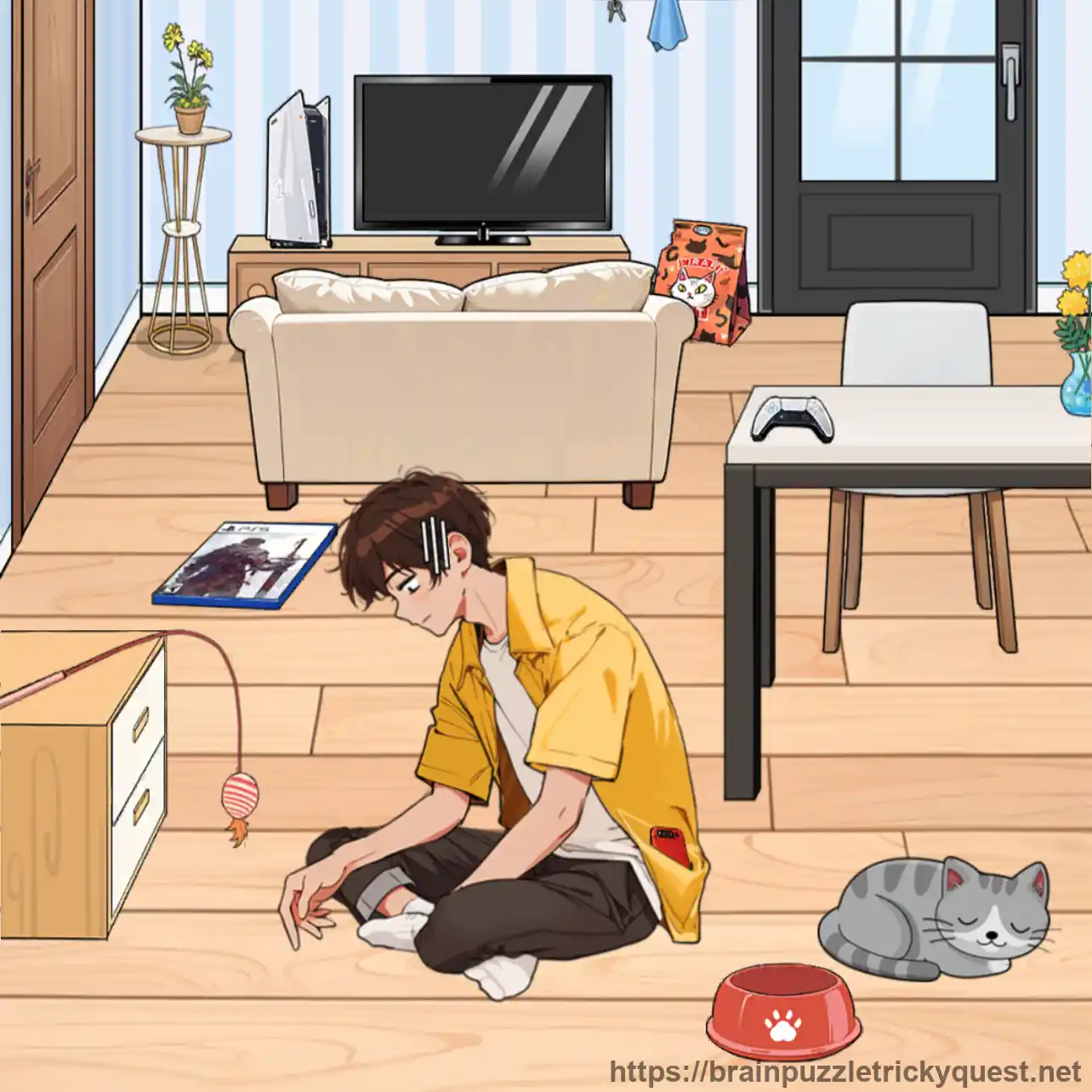
Welcome to Brain Puzzle: Tricky Quest Level 86! This boredom-busting scenario challenges you to help a restless boy find entertainment by discovering various activities around the house. From playing with phones to teasing cats to cooking meals, every action provides a new way to pass the time. This Brain Puzzle Tricky Quest Level 86 solution guide will walk you through every step with detailed explanations.
Your mission is to explore the house and unlock different entertainment options - technology, pets, music, gaming, TV, cooking, puzzles, and outdoor activities - to keep the boy occupied. This Tricky Quest Level 86 puzzle introduces an activity discovery mechanic where finding diverse entertainment sources prevents boredom.
Story Background
A young boy sits at home feeling incredibly bored with nothing to do. The house is full of potential entertainment, but he needs help discovering all the options available. From the phone in his pocket to the cat waiting to play, from hidden game disks to puzzle pictures on the wall, countless activities await. In Brain Puzzle Level 86, the key to happiness is finding creative ways to stay entertained.
Complete Solution for Brain Puzzle Tricky Quest Level 86
Quick Answer
Use the phone from the boy's pocket, feed and play with the cat, sing with a microphone, play computer games with a disk, watch TV, cook in the kitchen, solve a puzzle, and go outside in this Tricky Quest Level 86 challenge.
Step-by-Step Walkthrough
Step 1: Use the Phone
In Brain Puzzle Tricky Quest Level 86, open the Boy's Pocket to find his Phone. Take it out and let him play with it for a while to prevent boredom!
Step 2: Feed the Cat
For this Tricky Quest Level 86 step, drag the Cat Food to the Cat. Feeding the pet provides entertainment and prevents boredom in Brain Puzzle Level 86!
Step 3: Play with the Cat
Drag the to play with the cat. In Brain Puzzle Level 86, teasing the cat with the wand is a fun way to pass time!
Step 4: Sing with the Microphone
Open the First Drawer to find a Microphone. For this Brain Puzzle Tricky Quest Level 86, let the boy use it for Singing to prevent boredom!
Step 5: Play Computer Games
Find the Game Disk and insert it into the Computer. Then drag the Boy to Computer so he can play games in Tricky Quest Level 86!
Step 6: Watch TV
Tap the TV Screen to turn it on. In Brain Puzzle Level 86, Tom and Jerry will play, providing entertainment through cartoons!
Step 7: Cook in the Kitchen
Open the Kitchen Door and tap the Kitchen. For this Brain Puzzle Tricky Quest Level 86, the boy will go in and start Cooking, which prevents boredom!
Step 8: Solve a Puzzle
Take the Puzzle Picture from the Wall, scatter the pieces, and place them on the Table. The boy can now solve the puzzle in Tricky Quest Level 86!
Step 9: Go Outside
Finally, open the Room Door and let the boy go Outside to play. In Brain Puzzle Level 86, outdoor activities are the ultimate boredom cure!
Pro Tips for Brain Puzzle Tricky Quest Level 86
- Explore everything in Brain Puzzle - drawers, doors, and pockets hide entertainment
- Variety is key in Tricky Quest Level 86 - use multiple activities, not just one
- Interactive objects in this Brain Puzzle - pets, electronics, and games all work
- Save outdoor play for last in this Tricky Quest - it's the final entertainment option
Common Mistakes to Avoid in Level 86
| What Players Try | Why It Fails in Brain Puzzle Tricky Quest Level 86 |
|---|---|
| Using only one activity | Many Brain Puzzle solutions require discovering all entertainment options |
| Missing the game disk | The computer needs a disk to play games in Tricky Quest Level 86 |
| Not opening drawers | Hidden items like the microphone are essential in this Brain Puzzle Level 86 |
| Forgetting the puzzle | The wall picture must be used in Brain Puzzle |
Why This Brain Puzzle Tricky Quest Level 86 Solution Works
Brain Puzzle: Tricky Quest Level 86 is designed to teach you that preventing boredom requires discovering diverse activities. No single action is enough in this Tricky Quest - you must:
- Use technology - Phone and computer provide digital entertainment
- Interact with pets - Feeding and playing with the cat creates fun
- Explore creative outlets - Singing, cooking, and puzzles engage the mind
- Watch entertainment - TV provides passive relaxation
- Go outside - Physical activity is the ultimate solution
This activity discovery mechanic appears throughout Brain Puzzle Tricky Quest!
What You'll Learn from Level 86
After completing Brain Puzzle Tricky Quest Level 86, you'll understand:
- How to systematically explore environments in Brain Puzzle for hidden items
- That variety in Tricky Quest prevents boredom better than single activities
- The importance of checking storage areas like drawers and pockets
- Multi-activity entertainment mechanics in Brain Puzzle Level 86
Frequently Asked Questions about Brain Puzzle Tricky Quest Level 86
How do I prevent the boy's boredom in Brain Puzzle Level 86?
You must discover all nine entertainment options: phone from pocket, feed cat, play with cat, sing with microphone from drawer, play computer games with disk, watch TV, cook in kitchen, solve puzzle from wall, and go outside. Each activity helps in this Tricky Quest Level 86.
Where do I find the microphone in Tricky Quest Level 86?
Open the first drawer to find the microphone. The boy can then use it for singing, which is one of the entertainment activities needed to prevent boredom in Brain Puzzle Level 86.
Why won't the computer games work in Brain Puzzle Level 86?
You must first find and insert the game disk into the computer before the boy can play. After inserting the disk, drag the boy to the computer to start gaming in this Tricky Quest Level 86.
This walkthrough is for Brain Puzzle: Tricky Quest Level 86. Game content may vary between updates and platforms (iOS/Android). If this Brain Puzzle Tricky Quest solution doesn't match your game, the level numbers may have been rearranged in an update.